Skip to content

Lane Detection and Curve Fitting

The following functions are used to detect the lane lines. For one, lines can be detected using sliding windows. For the other, the lines are detected using the previous lines as a starting point.

To prevent the algorithm from detecting a line in the middle of the road, we use a offset from set midpoint when getting the starting points for the sliding windows.

Moreover, for every new live we calculate the Mean Squared Error (MSE) between the new line and the last one as a measure of discrepancy. If the MSE is too high (> 205), we use the last line instead of the new one as the new line does not seem to be valid.

In case there are many consecutive frames with a high MSE (n = 30), we try to detect the lines using the sliding windows technique again. This is only done, if the image is not too dark (sum of all pixels > 200000) because then the line detection based on sliding windows would probably not be successful.

Source

As a starting point we used an existing implementation of the curve calculation. But for this project we adapted and extended the code to our needs including extensions for performance improvements and handling of difficulties like shadows, changing light conditions and missing lines.

The original code can be found here

calculate_mean_squared_error(last_fit, new_fit, height)

Calculates the mean squared error of the new_fit polynomial compared to given last_fit polynomial.

Parameters:

Name Type Description Default
last_fit cv.Mat

Polynomial of 2 degrees

required
new_fit cv.Mat

Polynomial of 2 degrees

required
height int

Max y value the error should be calculated of

required

Returns:

Type Description
float

Mean Squared error

Source code in src/pipeline/lane.py
383
384
385
386
387
388
389
390
391
392
393
394
395
396
397
398
399
400
401
402
403
404
405
406
407
408
409
410
def calculate_mean_squared_error(last_fit: cv.Mat, new_fit: cv.Mat, height: int) -> float:
    """Calculates the mean squared error of the `new_fit` polynomial compared to given `last_fit` polynomial.

    Parameters
    ----------
    last_fit : cv.Mat
        Polynomial of 2 degrees
    new_fit : cv.Mat
        Polynomial of 2 degrees
    height : int
        Max y value the error should be calculated of

    Returns
    -------
    float
        Mean Squared error
    """
    y_values = np.linspace(0, height - 1, height).astype(np.int32)

    squared_error = np.sum(
        (
            ((last_fit[0] * y_values**2) + (last_fit[1] * y_values) + last_fit[2])
            - ((new_fit[0] * y_values**2) + (new_fit[1] * y_values) + new_fit[2])
        )
        ** 2
    ) / len(y_values)

    return float(squared_error)

draw_back_onto_the_road(img_undistorted, Minv, line_lt, line_rt, keep_state)

Draws the detected lane boundaries and fills the lane area.

  1. Dewarp the road and fill the lane area with green color
  2. Draw the detected lane boundaries on the dewarped image (in red and blue color)

Draw

Parameters:

Name Type Description Default
img_undistorted cv.Mat

The undistorted image the lane boundaries should be drawn on

required
Minv _type_

The inverse perspective transform matrix

required
line_lt _type_

The left line object

required
line_rt _type_

The right line object

required
keep_state _type_

If True, the average fit is used for drawing the lane boundaries

required

Returns:

Type Description
cv.Mat

The image in undistorted perspective with the lane boundaries and the filled lane area

Source code in src/pipeline/lane.py
320
321
322
323
324
325
326
327
328
329
330
331
332
333
334
335
336
337
338
339
340
341
342
343
344
345
346
347
348
349
350
351
352
353
354
355
356
357
358
359
360
361
362
363
364
365
366
367
368
369
370
371
372
373
374
375
376
377
378
379
380
def draw_back_onto_the_road(
    img_undistorted: cv.Mat, Minv: cv.Mat, line_lt: Line, line_rt: Line, keep_state: bool
) -> cv.Mat:
    """Draws the detected lane boundaries and fills the lane area.

    1. Dewarp the road and fill the lane area with green color
    2. Draw the detected lane boundaries on the dewarped image (in red and blue color)

    ![Draw](../images/draw.jpg)

    Parameters
    ----------
    img_undistorted : cv.Mat
        The undistorted image the lane boundaries should be drawn on
    Minv : _type_
        The inverse perspective transform matrix
    line_lt : _type_
        The left line object
    line_rt : _type_
        The right line object
    keep_state : _type_
        If True, the average fit is used for drawing the lane boundaries

    Returns
    -------
    cv.Mat
        The image in undistorted perspective with the lane boundaries and the filled lane area
    """
    h, w, _ = img_undistorted.shape

    left_fit = line_lt.average_fit if keep_state else line_lt.last_fit_pixel
    right_fit = line_rt.average_fit if keep_state else line_rt.last_fit_pixel

    # Generate x and y values for plotting
    ploty = np.linspace(0, h - 1, h)
    left_fitx = left_fit[0] * ploty**2 + left_fit[1] * ploty + left_fit[2]  # type: ignore
    right_fitx = right_fit[0] * ploty**2 + right_fit[1] * ploty + right_fit[2]  # type: ignore

    # Draw road as green polygon on original frame
    road_warp = np.zeros_like(img_undistorted, dtype=np.uint8)
    pts_left = np.array([np.transpose(np.vstack([left_fitx, ploty]))])
    pts_right = np.array([np.flipud(np.transpose(np.vstack([right_fitx, ploty])))])
    pts = np.hstack((pts_left, pts_right))
    cv.fillPoly(road_warp, np.array([pts], np.int_), (0, 255, 0))
    road_dewarped = cv.warpPerspective(road_warp, Minv, (w, h))  # Warp back to original image space

    blend_onto_road = cv.addWeighted(img_undistorted, 1.0, road_dewarped, 0.3, 0)

    # Separately draw solid lines to highlight them
    line_warp = np.zeros_like(img_undistorted)
    line_warp = line_lt.draw(line_warp, color=(255, 0, 0), average=keep_state)
    line_warp = line_rt.draw(line_warp, color=(0, 0, 255), average=keep_state)
    line_dewarped = cv.warpPerspective(line_warp, Minv, (w, h))

    lines_mask = blend_onto_road.copy()
    idx = np.any([line_dewarped != 0][0], axis=2)
    lines_mask[idx] = line_dewarped[idx]

    blend_onto_road = cv.addWeighted(src1=lines_mask, alpha=0.8, src2=blend_onto_road, beta=0.5, gamma=0.0)

    return blend_onto_road

get_fit_by_previous_line(name, line, nonzero, margin, h)

Calculates the fit of the line by the previous line.

This function represents a abstraction, to reduce code duplication.

Parameters:

Name Type Description Default
name str

The name of the line

required
line Line

The line object for which the fit is to be calculated

required
nonzero tuple[np.ndarray[Any, Any], ...]

Nonzero pixels in the image

required
margin int

Margin for the fit

required
h int

Height of the image

required

Returns:

Type Description
tuple[Any, Any, bool]

Indices of the pixels, fit of the line, if the line was detected

Source code in src/pipeline/lane.py
164
165
166
167
168
169
170
171
172
173
174
175
176
177
178
179
180
181
182
183
184
185
186
187
188
189
190
191
192
193
194
195
196
197
198
199
200
201
202
203
204
205
206
207
208
209
210
211
212
213
214
215
216
217
218
219
220
221
222
223
def get_fit_by_previous_line(
    name: str, line: Line, nonzero: tuple[np.ndarray[Any, Any], ...], margin: int, h: int
) -> tuple[Any, Any, bool]:
    """Calculates the fit of the line by the previous line.

    This function represents a abstraction, to reduce code duplication.

    Parameters
    ----------
    name : str
        The name of the line
    line : Line
        The line object for which the fit is to be calculated
    nonzero : tuple[np.ndarray[Any, Any], ...]
        Nonzero pixels in the image
    margin : int
        Margin for the fit
    h : int
        Height of the image

    Returns
    -------
    tuple[Any, Any, bool]
        Indices of the pixels, fit of the line, if the line was detected
    """
    nonzero_y, nonzero_x = nonzero

    fit_pixel = line.last_fit_pixel

    # x and y positions of all nonzero pixels in the image
    lane_inds = (nonzero_x > (fit_pixel[0] * (nonzero_y**2) + fit_pixel[1] * nonzero_y + fit_pixel[2] - margin)) & (  # type: ignore
        nonzero_x < (fit_pixel[0] * (nonzero_y**2) + fit_pixel[1] * nonzero_y + fit_pixel[2] + margin)  # type: ignore
    )

    # Extract left and right line pixel positions
    line.all_x, line.all_y = nonzero_x[lane_inds], nonzero_y[lane_inds]

    # If no pixels were found, use the last fit
    detected = True
    if not list(line.all_x) or not list(line.all_y):  # type: ignore
        fit_pixel = line.last_fit_pixel
        detected = False
    else:
        try:
            fit_pixel = np.polyfit(line.all_y, line.all_x, 2)  # type: ignore
        except LinAlgError:
            fit_pixel = line.last_fit_pixel
            detected = False

    # Calculate MSE to check if the fit is valid or differs too much from the last fit
    mean_squared_error = calculate_mean_squared_error(fit_pixel, line.last_fit_pixel, h)  # type: ignore

    # If the MSE is too high, use the last fit
    if mean_squared_error > 205:
        logger.debug(f"{name}_mean_squared_error: {mean_squared_error}")
        fit_pixel = line.last_fit_pixel
        line.detected = False
        line.error_count += 1

    return lane_inds, fit_pixel, detected

get_fits_by_previous_fits(img_birdeye, line_lt, line_rt)

Searches for the lines in the birdeye image by using the previous fits.

Parameters:

Name Type Description Default
img_birdeye cv.Mat

The birdeye image in which the lines are to be searched

required
line_lt Line

The current left line

required
line_rt Line

The current right line

required

Returns:

Type Description
tuple[cv.Mat, Line, Line]

The output image, the updated left line and the updated right line

Source code in src/pipeline/lane.py
226
227
228
229
230
231
232
233
234
235
236
237
238
239
240
241
242
243
244
245
246
247
248
249
250
251
252
253
254
255
256
257
258
259
260
261
262
263
264
265
266
267
268
269
270
271
272
273
274
275
276
277
278
279
280
281
282
283
284
285
286
287
288
289
290
291
292
293
294
295
296
297
298
299
300
301
302
303
304
305
306
307
308
309
310
311
312
313
314
315
316
317
def get_fits_by_previous_fits(img_birdeye: cv.Mat, line_lt: Line, line_rt: Line) -> tuple[cv.Mat, Line, Line]:
    """Searches for the lines in the birdeye image by using the previous fits.

    Parameters
    ----------
    img_birdeye : cv.Mat
        The birdeye image in which the lines are to be searched
    line_lt : Line
        The current left line
    line_rt : Line
        The current right line

    Returns
    -------
    tuple[cv.Mat, Line, Line]
        The output image, the updated left line and the updated right line
    """
    h, w = img_birdeye.shape

    # Gets the last polynomial coefficients
    left_fit_pixel = line_lt.last_fit_pixel
    right_fit_pixel = line_rt.last_fit_pixel

    # Set the width of the windows +/- margin
    nonzero = img_birdeye.nonzero()
    margin = 50
    n_windows = 9
    window_height = int(h / n_windows)

    histogram = np.sum(img_birdeye[h // 2 : -15, :], axis=0)

    midpoint = len(histogram) // 2

    off_x = w * 0.04

    # Peak of the left and right halves of the histogram (but off_x pixels from the midpoint)
    leftx_base = np.argmax(histogram[: int(midpoint - off_x)])
    rightx_base = np.argmax(histogram[int(midpoint + off_x) :]) + midpoint

    # Calculate the sum of the pixels (i.e. how light it is) in the image
    sum_light = np.sum(img_birdeye)

    # If there were too many errors in the last fits and the image is not too dark, refit the lines by sliding windows
    if line_lt.error_count > 30 and sum_light > 200000:  # type : ignore
        logger.info(f"Refitting left lane")
        left_lane_inds, left_fit_pixel, left_detected = lane_sliding_windows(
            img_birdeye, line_lt, nonzero, 9, 80, margin, h, leftx_base
        )
    else:
        left_lane_inds, left_fit_pixel, left_detected = get_fit_by_previous_line("left", line_lt, nonzero, margin, h)

    if line_rt.error_count > 30 and sum_light > 200000:  # type : ignore
        logger.info(f"Refitting right lane")
        right_lane_inds, right_fit_pixel, right_detected = lane_sliding_windows(
            img_birdeye, line_rt, nonzero, n_windows, window_height, margin, h, rightx_base
        )
    else:
        right_lane_inds, right_fit_pixel, right_detected = get_fit_by_previous_line(
            "right", line_rt, nonzero, margin, h
        )

    # Update the line objects
    line_lt.update_line(left_fit_pixel, detected=left_detected)
    line_rt.update_line(right_fit_pixel, detected=right_detected)

    # Generate x and y values for plotting
    ploty = np.linspace(0, h - 1, h)
    left_fitx = left_fit_pixel[0] * ploty**2 + left_fit_pixel[1] * ploty + left_fit_pixel[2]
    right_fitx = right_fit_pixel[0] * ploty**2 + right_fit_pixel[1] * ploty + right_fit_pixel[2]

    # Prepare output image
    img_fit = np.dstack((img_birdeye, img_birdeye, img_birdeye))
    window_img = np.zeros_like(img_fit)

    # Color in left and right line pixels
    img_fit[nonzero[0][left_lane_inds], nonzero[1][left_lane_inds]] = [255, 0, 0]
    img_fit[nonzero[0][right_lane_inds], nonzero[1][right_lane_inds]] = [0, 0, 255]

    # Generate a polygon to illustrate the search window area
    left_line_window1 = np.array([np.transpose(np.vstack([left_fitx - margin, ploty]))])
    left_line_window2 = np.array([np.flipud(np.transpose(np.vstack([left_fitx + margin, ploty])))])
    left_line_pts = np.hstack((left_line_window1, left_line_window2))
    right_line_window1 = np.array([np.transpose(np.vstack([right_fitx - margin, ploty]))])
    right_line_window2 = np.array([np.flipud(np.transpose(np.vstack([right_fitx + margin, ploty])))])
    right_line_pts = np.hstack((right_line_window1, right_line_window2))

    # Draw the lane onto the warped blank image
    cv.fillPoly(window_img, np.array([left_line_pts], np.int_), (0, 255, 0))
    cv.fillPoly(window_img, np.array([right_line_pts], np.int_), (0, 255, 0))
    result = cv.addWeighted(img_fit, 1, window_img, 0.3, 0)

    return result, line_lt, line_rt

get_fits_by_sliding_windows(img_birdeye, line_lt, line_rt, n_windows=9)

Gets the new lines on the given birdeye image by new sliding windows
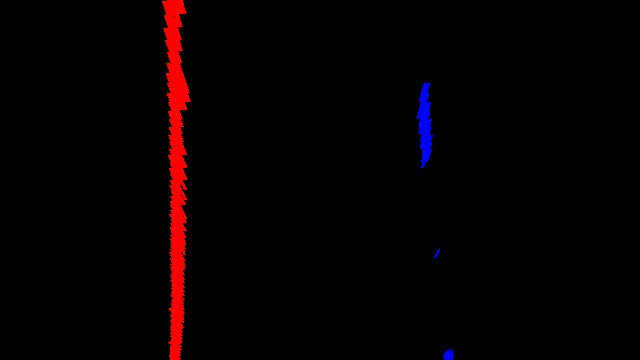
Poly

Parameters:

Name Type Description Default
img_birdeye cv.Mat

The birdeye image for which the lines are to be detected

required
line_lt Line

The current left line

required
line_rt Line

The current right line

required
n_windows int, optional

The number of windows, by default 9

9

Returns:

Type Description
tuple[cv.Mat, Line, Line]

The output image with the new lines drawn on it, the new left line and the new right line

Source code in src/pipeline/lane.py
 99
100
101
102
103
104
105
106
107
108
109
110
111
112
113
114
115
116
117
118
119
120
121
122
123
124
125
126
127
128
129
130
131
132
133
134
135
136
137
138
139
140
141
142
143
144
145
146
147
148
149
150
151
152
153
154
155
156
157
158
159
160
161
def get_fits_by_sliding_windows(
    img_birdeye: cv.Mat, line_lt: Line, line_rt: Line, n_windows=9
) -> tuple[cv.Mat, Line, Line]:
    """Gets the new lines on the given birdeye image by new sliding windows

    ![Poly](../images/poly.jpg)

    Parameters
    ----------
    img_birdeye : cv.Mat
        The birdeye image for which the lines are to be detected
    line_lt : Line
        The current left line
    line_rt : Line
        The current right line
    n_windows : int, optional
        The number of windows, by default 9

    Returns
    -------
    tuple[cv.Mat, Line, Line]
        The output image with the new lines drawn on it, the new left line and the new right line
    """
    h, w = img_birdeye.shape

    off_x = w * 0.04

    # Histogram of the bottom half of the image
    histogram = np.sum(img_birdeye[h // 2 : -15, :], axis=0)

    # Prepare the output image
    out_img = np.dstack((img_birdeye, img_birdeye, img_birdeye))

    midpoint = len(histogram) // 2

    # Peak of the left and right halves of the histogram (but off_x pixels from the midpoint)
    leftx_base = np.argmax(histogram[: int(midpoint - off_x)])
    rightx_base = np.argmax(histogram[int(midpoint + off_x) :]) + midpoint

    window_height = int(h / n_windows)

    # x and y positions of all nonzero pixels in the image
    nonzero: tuple[np.ndarray[Any, Any], ...] = img_birdeye.nonzero()
    nonzero_y, nonzero_x = nonzero

    margin = 50  # width of the windows +/- margin

    # Get new indices and coefficients for the left and right lines by sliding windows
    left_lane_inds, left_fit_pixel, left_detected = lane_sliding_windows(
        img_birdeye, line_lt, nonzero, n_windows, window_height, margin, h, leftx_base
    )
    right_lane_inds, right_fit_pixel, right_detected = lane_sliding_windows(
        img_birdeye, line_rt, nonzero, n_windows, window_height, margin, h, rightx_base
    )

    # Update line objects
    line_lt.update_line(left_fit_pixel, detected=left_detected)
    line_rt.update_line(right_fit_pixel, detected=right_detected)

    out_img[nonzero_y[left_lane_inds], nonzero_x[left_lane_inds]] = [255, 0, 0]
    out_img[nonzero_y[right_lane_inds], nonzero_x[right_lane_inds]] = [0, 0, 255]

    return out_img, line_lt, line_rt

lane_sliding_windows(img, line, nonzero, n_windows, window_height, margin, h, x_current, minpix=25)

Gets the new line on the given birdeye image by new sliding windows

Parameters:

Name Type Description Default
img cv.Mat

Input image in birdeye perspective

required
line Line

Line on which the sliding window is to be applied to

required
nonzero tuple[np.ndarray[Any, Any], ...]

All the nonzero pixels of the input image

required
n_windows int

Number of sliding windows used to search for the lines

required
window_height int

Height of the windows

required
margin int

Helps Calculate window boundaries

required
h int

Height of the input image

required
x_current np.int_

Used to calculate window boundaries

required
minpix int, optional

Boundary which decides if window is recentered, by default 25

25

Returns:

Type Description
tuple[Any, Any, bool]

Indices of the lane, Coefficients of the curve, Boolean if lane was detected

Source code in src/pipeline/lane.py
12
13
14
15
16
17
18
19
20
21
22
23
24
25
26
27
28
29
30
31
32
33
34
35
36
37
38
39
40
41
42
43
44
45
46
47
48
49
50
51
52
53
54
55
56
57
58
59
60
61
62
63
64
65
66
67
68
69
70
71
72
73
74
75
76
77
78
79
80
81
82
83
84
85
86
87
88
89
90
91
92
93
94
95
96
def lane_sliding_windows(
    img: cv.Mat,
    line: Line,
    nonzero: tuple[np.ndarray[Any, Any], ...],
    n_windows: int,
    window_height: int,
    margin: int,
    h: int,
    x_current: np.int_,
    minpix: int = 25,
) -> tuple[Any, Any, bool]:
    """Gets the new line on the given birdeye image by new sliding windows

    Parameters
    ----------
    img : cv.Mat
        Input image in birdeye perspective
    line : Line
        Line on which the sliding window is to be applied to
    nonzero : tuple[np.ndarray[Any, Any], ...]
        All the nonzero pixels of the input image
    n_windows : int
        Number of sliding windows used to search for the lines
    window_height : int
        Height of the windows
    margin : int
        Helps Calculate window boundaries
    h : int
        Height of the input image
    x_current : np.int_
        Used to calculate window boundaries
    minpix : int, optional
        Boundary which decides if window is recentered, by default 25

    Returns
    -------
    tuple[Any, Any, bool]
        Indices of the lane, Coefficients of the curve, Boolean if lane was detected
    """

    lane_inds = []

    nonzero_y, nonzero_x = nonzero

    # For each sliding window
    for window in range(n_windows):
        # Get boundaries of the window
        win_y_low = h - (window + 1) * window_height
        win_y_high = h - window * window_height
        win_x_low = x_current - margin
        win_x_high = x_current + margin

        # Draw the windows on the visualization image
        cv.rectangle(img, (win_x_low, win_y_low), (win_x_high, win_y_high), (0, 255, 0), 2)

        # Identify the nonzero pixels in x and y within the window
        good_inds = (
            (nonzero_y >= win_y_low) & (nonzero_y < win_y_high) & (nonzero_x >= win_x_low) & (nonzero_x < win_x_high)
        ).nonzero()[0]

        # Append these indices to the lists
        lane_inds.append(good_inds)

        # If you found > minpix pixels, recenter next window on their mean position
        if len(good_inds) > minpix:
            x_current = np.int_(np.mean(nonzero_x[good_inds]))

    # Concatenate the arrays of indices
    lane_inds = np.concatenate(lane_inds)

    # Reset line squared error count
    line.error_count = 0

    # Extract left and right line pixel positions
    line.all_x, line.all_y = nonzero_x[lane_inds], nonzero_y[lane_inds]  # type: ignore

    detected = True
    # If no pixels were found, use the last fit
    if not list(line.all_x) or not list(line.all_y):  # type: ignore
        fit_pixel = line.last_fit_pixel
        detected = False
    else:
        fit_pixel = np.polyfit(line.all_y, line.all_x, 2)  # type: ignore

    return lane_inds, fit_pixel, detected